Resources

A real stats table, fun-facts questions, a season write-up, or the whole roster. The front has the photo, the back has the story, and both print in full color.
Kids flip a card over before they read the front. The back is where a trading card stops being a photo and starts being a record of a season: batting average, innings pitched, the walk-up song, the nickname, the team they played with. A card with a blank back feels like a sticker. A card with stats feels like the real thing.
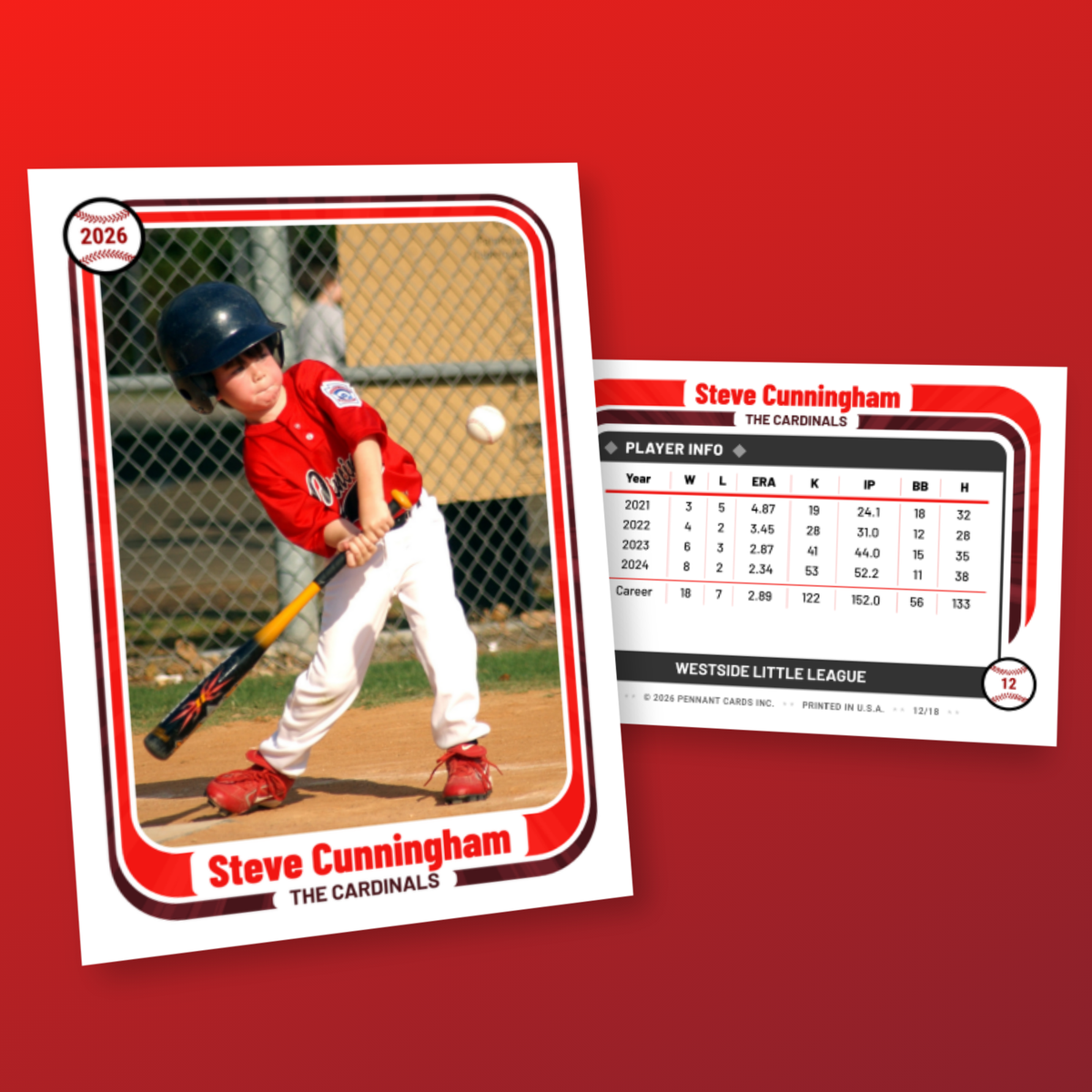
Pennant Cards gives every design four back layouts. A stats table takes real numbers with columns you name. A player info layout takes questions and answers. A custom text block takes a write-up. A roster layout lists the whole team. Pick one, or put two on the same back. The design handles the typography and the colors so the back matches the front.
Designing is free. Printed cards start at $1.25 each with an 18-card minimum, printed front and back on 16pt gloss cardstock.
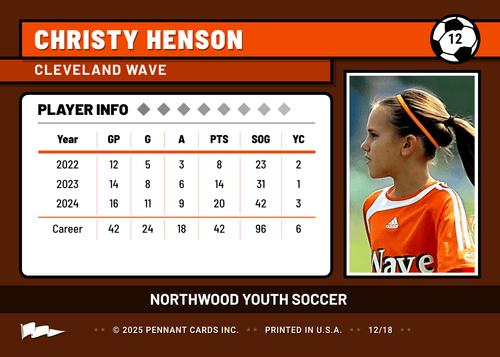
Real numbers in rows and columns. You name the columns (AVG, HR, RBI, IP, ERA, K) and add a row per season, plus a career total if you want one.
Question-and-answer lines: nickname, favorite player, walk-up song, position, superpower. You write the questions, parents or players fill in the answers.
A paragraph of your own: season highlights, a short bio, a coach's note, or a "Did you know?" fact about the player.
The full roster with numbers and coaches, generated from the players in the project. Add a player and every card's roster updates.
The table is yours to define. These are the columns that show up most on youth baseball cards.
G, AB, H, AVG, HR, RBI, R, SB, OBP. Most youth teams keep it to four or five columns so the type stays readable.
IP, W, L, ERA, K, BB, SV. Put pitching in a second row block, or give the pitchers a second table.
PO, A, E, FPCT. Rare on youth cards, but a nice touch for a kid who lives at shortstop.
One row per year, so a returning player's card shows 2024, 2025, 2026, and a career line.
Copy them from GameChanger, your scorebook, or the league site into the table. Parents can enter their own kid's stats through the project form link.
T-ball, coach pitch, and most rec teams do not keep stats. The player info layout gives those kids a back that is just as full. The two layouts can also share one back.
The player's photo with the background removed, their name, and their jersey number in the design's typeface.
Position, team name, and the season year, placed by the design so every card in the set lines up.
Primary and secondary colors run through the front and back. Upload a logo and place it on either side.
A baseball by default, with softball, soccer, basketball, football, and hockey icons for other teams.
Searching for a baseball card template usually ends with a Canva file or a Word document where you type each kid's name and paste each photo by hand. For one card that is fine. For a 14-player team it is an afternoon, and the stats table is the part that goes wrong.
Here, the design is the template. Add the roster once, pick the stats layout, and every card is generated with the same columns and the same layout. Send parents the project form link and they type in their own kid's numbers and answers. When the season ends and a kid's batting average changes, you edit one field and the card updates.
"Easy to customize, great communication. Our team loved them!"
"Cards were great and very good quality of material and printed images. Highly recommended"
"We had an amazing experience working with Pennant Cards, the staff was extremely accommodating and quick to respond to any and all questions we had. We received our cards very quickly and they were amazing quality. We are extremely pleased with the final products and would recommend Pennant cards to any team looking to get a set of cards made!"
"Andrew was wonderful to work with! This was my first time making team cards and I had a lot of questions, and he answered every one of them in a very timely and helpful manner. The quality and designs of the cards exceeded my expectations. So many ways to personalize the designs! Fun to make and fun to hand out to some very deserving kids! I'll definitely be a returning customer in the future. Highly recommend!"
"This is my second time ordering cards from Pennant Cards and they came out even better than the first order. Great work and highly recommended."
"Fairly intuitive and easy online card designing process. Cards turned out nicely. Reasonable price."
"I ordered for the entire team, each player had a team pack, and enough extra to share with their family. The design process was easy, and the cards are great quality and very affordable. Our team players and parents were very impressed! Customer service was great when I had a question. I will be ordering again for future seasons!"
"I cannot recommend this company enough! It was the perfect option for making custom baseball cards for our team! The website is very user friendly, and once I submitted the project a representative from the company reached out via email with recommended design changes. The cards arrived in a timely manner, and the quality exceeded my expectations. The kids loved seeing themselves on the cards when I gave them out, and the parents were ecstatic. I received numerous messages from parents about how awesome the cards are and how excited their kid was about them. I have already recommended Pennant Cards to other teams/coaches, and will certainly be using them again for future teams!"
"From creating the cards to speaking about shipping, this was by far the most perfect experience I could have asked for. Our entire soccer team was amazed at their surprise end of season gift. Thank you so much Pennant Cards!!"
"Great cards at a good price. Design and set up was easy and user friendly."
"Made some cards for a few 8u teams and the kids loved them. Process was easy and they came out great"
"The cards turned out great. Great quality with a quick turnaround. The best part was the customer service! A representative reached out with a few suggestions on how to make the cards even better. Resulted in cards the whole team were excited for."
"I've ordered custom baseball cards for my son's baseball team from multiple companies over the last few years and Pennant Cards has been the best by far in every aspect: 1. The site is extremely user friendly. It's so easy to build your cards. 2. The quality is the best I've seen. They clearly use a great printer and do a great job of maintaining the color and brightness of the photos submitted. 3. Cost - I got more cards from Pennant for substantially less money than I did with another company last year. Will definitely use Pennant again and excited to play around with the different card templates."
"Best baseball player gift ever! The process is very easy and fast. I sent in my order and they reached out to me immediately with a couple of suggestions to make to cards look better and fixed them for me right then. I will definitely do this again."
"Cards were as advertised. Design phase was easy and shipping was quick. Thanks"
"These cards are awesome! So excited to bring these to the end of the year party tomorrow"
"Ordered a 'team' of cards for our wedding as my fiance loves sports and card collecting. We used photos of friends and family, and made 'packs' to hand out. Very customizable, easy to use site, reasonably priced and they came out great! Thank you!"
"This is the BEST site for custom baseball cards. The design process was so simple - I was able to easily design cards for a team of 24 kids. And the cards look amazing! They are really high quality and look and feel just like real baseball cards."
"Everything was so easy to do and turned out great. The cards were a big hit with the kids and families. Thank you for being helpful and responsive to make the whole process perfect."
"I LOVED how easy your app was to create these cards! This was a project I've wanted to do for the last 3 seasons but could never get anything to look great. Your site was simple to use and the cards look GREAT!"
"The whole process was awesome from start to finish - ease of the site, the design options, and level of service. I am especially grateful that they cared enough to reach out with a design recommendation to ensure ultimate satisfaction."
"Our team cards came out AMAZING and the entire team was beyond thrilled! We can't wait to order a new deck next season!"
"The cards were beyond AMAZING and all the kids loved them!"
"The customer service with this company is outstanding! I had many questions and they were answered very quickly, and the baseball cards they made for me are such great quality!!!"
"These cards far exceed my expectations!! Thank you so much!!"
"These cards are such good quality - and the process to create them super simple with great communication from the Pennant Team. Will definitely be ordering more!"
"My daughter's team lost their minds over the cards, thanks again!"
Stats on the back cost nothing extra. Set the players and cards per player to match your team.
Yes. Every design supports a stats table layout with columns you name yourself and a row per season, so a card can show one year or several plus a career total. The numbers print in the design's typeface and colors, so the back looks like a retail card rather than a spreadsheet.
The player info layout: a list of questions and answers such as nickname, favorite MLB player, walk-up song, and favorite position. You choose the questions and parents answer them through the form link. If a family never fills it in, the card falls back to a verified baseball fact so no back is left blank.
Yes. Each project has a form link you can text or email to families. Parents upload a photo and fill in the fields you chose. You review every card before ordering, so a typo never makes it to print.
Yes. Any two layouts can share one back, stacked or side by side, in six arrangements. A stats table above a team roster and player info next to a season write-up are the two most common pairings. Try them in the back layout demo.
Yes. Cards print in full color on both sides on 16pt C2S cardstock with a UV gloss front, cut to 2.5 by 3.5 inches. See baseball card printing for the full specs.
The same as any other card. Designing is free. Printed cards start at $1.25 each and drop with quantity, with a 18-card minimum and at least 18 copies per player. Digital downloads start at $25.
What thousands of kids put on the back of their cards, and how the back layouts came to be.
Sign up free, add a player, and see the stats table on a card in a couple of minutes.