Last year, a team of people spent weeks manually creating baseball cards for my son's 150-player little league. That experience led me to build Pennant Cards to streamline the process. This year, I used it to produce cards for the league again, this time for 190 players across 14 teams. Here's how we pulled off the project with minimal time and budget.

With 190 players across 14 teams, we wanted to make professional-looking cards, but we wanted to try having each team handle their own photography, since the league was paying for the cards, and last year the work of coordinating with one photographer was a massive amount of work for the photographer as well as for the league.
Step 1: Scheduling
The league president sent out an email to the entire league, asking for volunteers from each team to take photos of their players. We made it clear that there was going to be a single photo day on Saturday, with the following Saturday as a makeup day, as almost every team had a few kids not able to attend.
By the next day, every team had at least one parent volunteer signed up to take photos of the team. We had a mix of iPhone photographers, hobbyists with nice cameras, and a couple professional photographers in the mix.
Step 2: Photography
The Photo Day Process
We asked the parent photographers to take the following photos: one photo of each player holding a piece of paper with their name on it (so that we could match the player to the name - the last thing we wanted to do was have player photos mixed up), and an action shot or a portrait shot (or both) - ideally with a real camera, but otherwise with an iPhone in portrait mode. We also asked each team to take a team photo, with or without the coaches.
"Just Email Me the Photos"
We asked all of the team photographers to email the photos to me, and then I would then go in and upload them myself in the Pennant Cards app. I ended up with a different process for each team. Some teams provided the final selection of photos, using the player's names as the filename, which made the uploading process extremely easy. Other parents sent 20 photos per player, all with numeric file names. That slowed things down, because I then needed to make sense of the files and select a photo for each player.
Some parents emailed links to a shared iCloud folder, or a Dropbox folder. Others put all of the photos into emails, and if the photos ended up embedded inside the email message, the email program scaled the image dimensions down to an unusable 480x640.
In hindsight, I should have asked the team photographers to share an album using iCloud, Google Drive, Dropbox, or whatever they were comfortable with, and provided a little bit more guidance around what to send (i.e. naming each file with the player name). A little bit of additional work from each team photographer would've cut down on the work on my end in compiling and selecting all of the photos to upload.
Photo Quality
We ended up with a range in photo quality that you might expect. A lot of iPhone portraits, some hobbyist parents with a real camera, and the work of a few working, professional photographers. At the size these photos are scaled down to, the range in quality becomes much less noticeable.
Step 3: Collecting Stats from Parents
With photo day behind us, and with five fun questions selected (Nickname, Favorite Ballplayer, Walk-up Song, Favorite Position, and Baseball Superpower), we sent out a link to the entire league so that parents could enter their player's stats. It's a single, secure link for the entire league, and the parents didn't need to create an account - they just needed to enter their player's name to "sign in".
I'm happy to say that Pennant did what it was designed to do. The uploading, scaling and positioning of each player's photo was easy and fast. And with little exception, all parents successfully filled out their player's "stats", and any that missed photo day were able to upload their photos themselves. The few players that didn't have stats filled out got a random "Did You Know?" fact about baseball on the back of their card, so it wasn't blank and they'd still have something interesting to see and share.
I personally appreciated not having to worry about data entry errors or misspelled names. Each parent was able to confirm that their player's name was correct, and they entered their player's stats themselves. When we did this by hand last year, my biggest worry was that a player was going to open their cards and see the wrong name or a photo of a different player.
Step 4: Chasing down the Last Few Players
We did have a few stragglers that didn't have photos. I was able to use a couple different views in Pennant Cards to figure out which players were still missing what, and contacted the parents to ask for a photo or their player data. In the end, we only had four players missing - three of which had left the league.
Step 5: Ordering and Packaging
Once we hit the deadline, I placed the order. We've sourced a number of independent print shops around the US at Pennant so that we can turn around orders quickly. In this case we used a neighborhood print shop to print the cards, so we were able to pick up the cards a few days later.
Because we were getting the cards ahead of time, we were able to package up the cards to make handing them out easier. There are plenty of options for how to DIY this step. We ended up purchasing 200 white 3x5" waxed paper bags from Amazon. Each player was getting 18 cards plus a single team card, so the stack of cards fit snugly in that size. We had small printer labels on hand, so we used those to print out each player name to seal each bag.
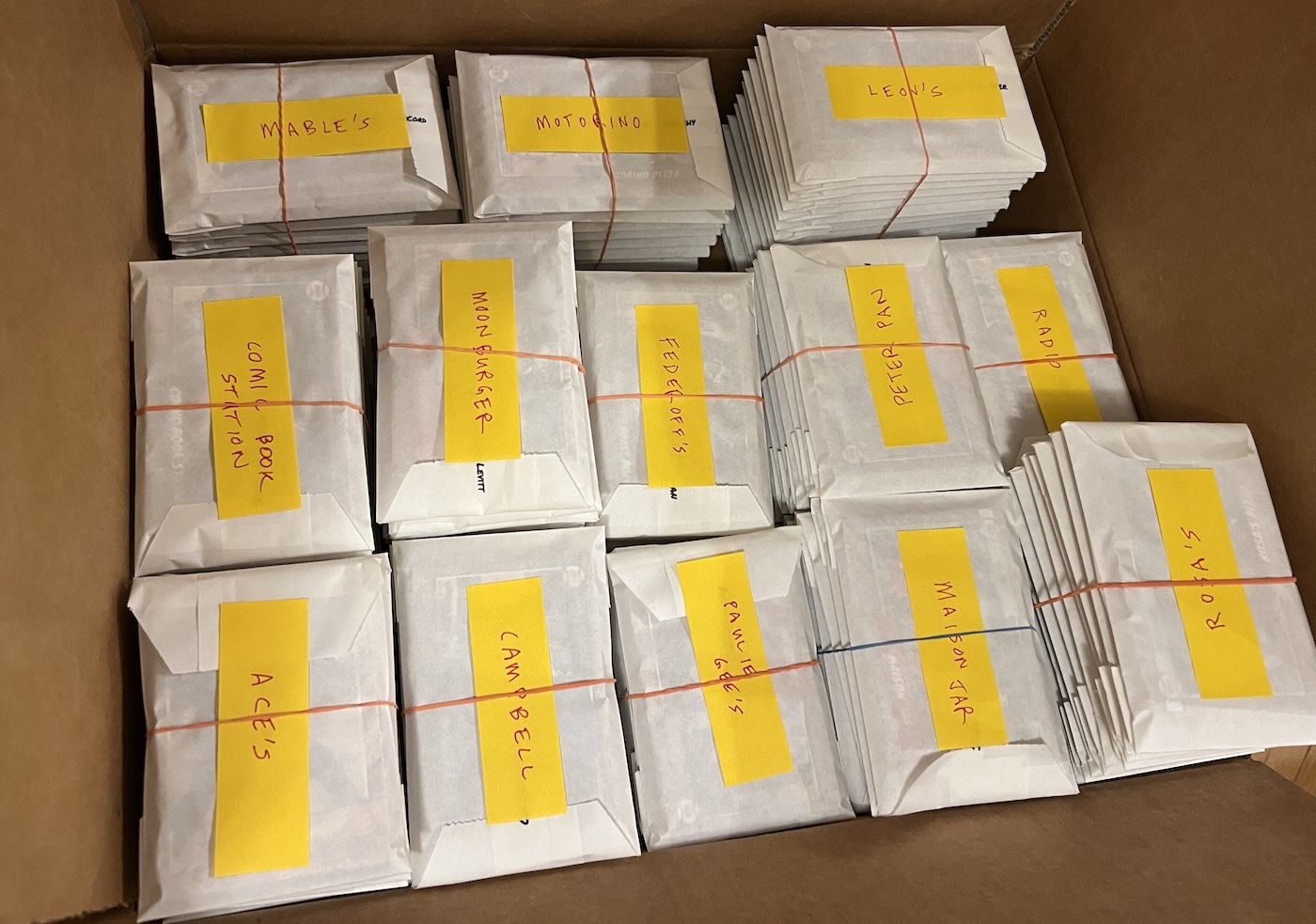
We considered other options, such as tuckboxes (too big, made for a full or half deck of cards) and rubber bands (that's a lot of rubber bands, and they can damage the cards). Mylar and plastic bags are also an option - they would've kept the cards nicely sealed and dry in case of rain, but knowing that mylar will never decompose, and not wanting to create a bunch of non-recyclable, non-biodegradable plastic waste at the end-of-season award ceremony, we went with the waxed paper bags, and they worked out great.
Reception
The feedback from parents and players was super positive. I only was able to see my son's team and the team they were playing that day get their cards, but it was a lot of fun to see how excited they were to get their own cards and trade with each other so they'd end up with a full set.

A group of parents reached out afterwards, asking about ordering extra copies - some just wanted more, others said their player accidentally traded all of their cards away. So we created a second, smaller order for the parents that wanted an extra copy.
Final Cost
With a total of 3,600 cards printed, the final total cost was less than $5 per player. It was cheap enough that the league was able to pick up the tab using existing player dues, so parents didn't have to pay extra.
Key Takeaways If You're Considering This
- Go with one photo day and one backup day - set (and keep) clear deadlines, otherwise the project can stall
- Ask for named photos using shared albums, not emailed - hi-res photos of a team are big files, and email is not a great way to send them
- Start early - especially for an entire league, it's a good idea to have a little extra wiggle room just in case
- The end result is worth it - not only seeing kids' reactions in the moment, knowing that the player and team cards will be fun to look at for years, decades down the road
- You can do this! - we're happy to help you make cards for your league happen.